Overview
This release marks a significant step forward in making Fawry Business HR smarter, faster, and more scalable. With powerful new monitoring capabilities, enhanced payroll intelligence, and improved global workforce support, HR teams can now manage operations, compliance, and engagement with greater confidence all in one place.
New Features
Location Capacity Monitor
We’re excited to introduce the Location Capacity Monitor, a powerful new feature that gives HR and operations teams real-time visibility into workforce presence across all locations locally and internationally.
Key Capabilities
-
Instant Location Monitoring: Track attendance and capacity status for every managed location in real time.
-
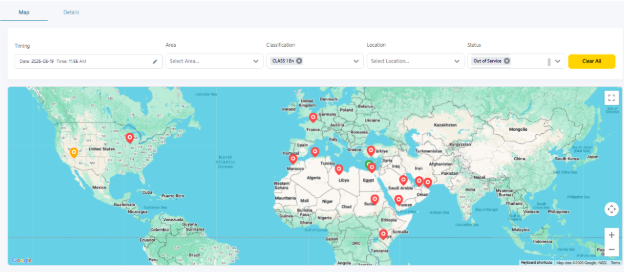
Global Map View: Visualize all locations on an interactive world map with color-coded status indicators:
-
Green: Full Capacity (all planned jobs are attending)
-
Blue: Over Capacity (attendance exceeds planned capacity)
-
Yellow: Partial Capacity (attendance below planned capacity)
-
Red: Zero Capacity (no attendance)
-
Grey: Out of Service (location is closed)
-
-
Location Drill-Down: Click any location pin to view detailed information about attendance and assigned employees.
Setup
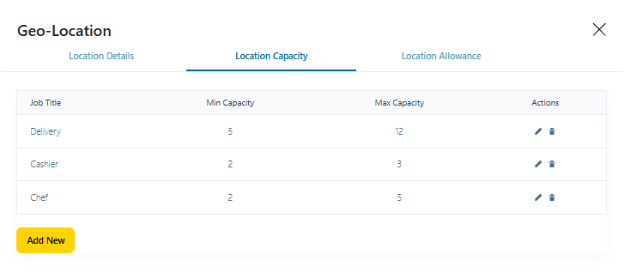
- Define minimum and maximum job capacity per location.
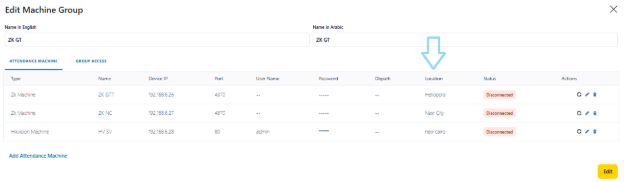
- Link attendance machines directly to locations for accurate tracking.
Detailed Insights
-
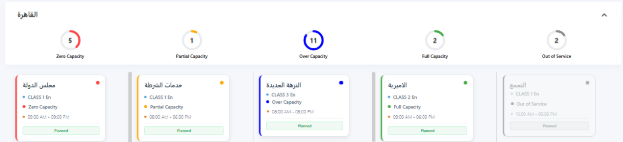
View detailed summaries grouped by area.
-
Analyze attendance status through visual charts showing employee distribution by capacity status.
-
Access planned capacity and real-time attendance details with a single click.
Location Allowance
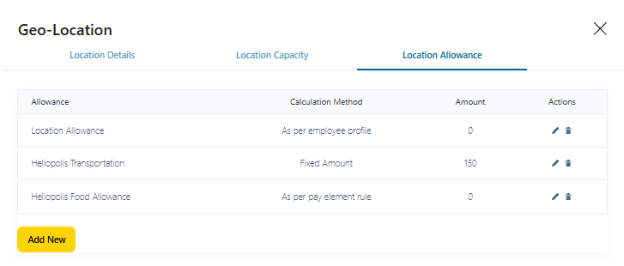
We’re introducing Location Allowance, a flexible feature that enables employees to earn allowances based on the locations where they clock in and out.
Location Allowance Setup
-
Configure location-based allowances from Payroll Management using Periodic or One-Time Entitlements.
-
Select the Location Allowance classification to enable location-based calculations.
Calculation Methods
-
Fixed Amount: Employees receive a fixed allowance when clocking in at a specific location.
-
As per Employee Profile: Allowance is calculated based on values defined in the employee profile.
-
As per Pay Element Rule: Allowance is calculated according to the selected pay element’s rules.
Time Zone Management
Fawry Business HR now supports multiple time zones across locations, business units, and organizations ensuring accurate attendance tracking for:
-
Global workforce
-
Expatriates
-
Offshore and international employees
Enhancements
Web Portal Enhancements
Leave Management Setup
Leave eligibility periods have been enhanced with two new options:
-
Calendar Month: Leave balance is assigned monthly based on the calendar month.
-
Payroll Month: Leave balance is assigned monthly based on defined payroll periods.
Leave Balance Initialization
- Improved initialization logic now updates leave balances and reassigns leave rules automatically based on changes in employee previous experience.
View Employee
- Line Manager name display is now aligned with the selected system language.
Employees Detailed Loader
- Enhanced to support loading Previous Experience data.
Mobile Application Enhancements
My Leave Summary
- Improved leave dashboard now clearly displays used days versus available balance.
Loan Requests
- Loan request details under Requests section now show full details, aligned with the web portal experience.
Pay Slip
-
Pay slip display on the home page now shows data for the logged-in user only.
-
Authorized users can access pay slips for all or selected employees through the Inquiries section.
In Summary
Release 2.4.5 empowers HR teams with deeper visibility, smarter payroll handling, and stronger global workforce support helping organizations operate efficiently, stay compliant, and scale with confidence.